
|
Size: 1158
Comment:
|
Size: 2103
Comment:
|
| Deletions are marked like this. | Additions are marked like this. |
| Line 5: | Line 5: |
| {{attachment:origin.jpeg}} |
|
| Line 7: | Line 9: |
| ---- | |
| Line 8: | Line 11: |
{{attachment:newparam.jpeg}} |
|
| Line 11: | Line 16: |
| ---- == 2, Overview of the convertion. == currently the following types of program can be converted. * lstr * rep * cont to convert any of these program invlove the following step 1. declear the program use the clickable dialogue. 1. convert the s_flddes / s_outflddes lists 1. implement the "paramctl()" function. ---- == 3, declear using clickable dialogue. == since we cannot convert all the program in the same time so we need a way to define which program is clickable and which program is not. To declear a program is clickable simply set the global variable "guiparamready" to YES in the spclinit() function, the spclinit() function get run in the very beginning of the run time. following is an example {{{ spclinit() { IMPORT BOOL guiparamready; guiparamready = YES; init_query(&gl_query[0]); } }}} |
Converting Input screen from non-clickable to clickable
1, Indroduction.
A simplified explanation of how the original program work was show in following diagram,
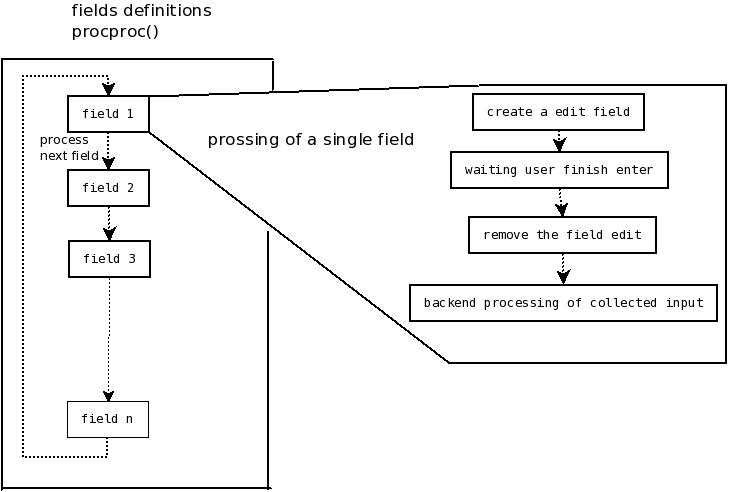
As shown in the diagram, we create a edit field for field 1, then after the user finish editing it we remove it. In other words, at any instance only one edit field was presented, the other field which look like a edit field is actually a label which look like a edit field. So that is why clicking on the other fields will not work.
To be able to have a clickable program , we must have every edit field present the same time. Following is a simplified version of what is going on when the program was converted.
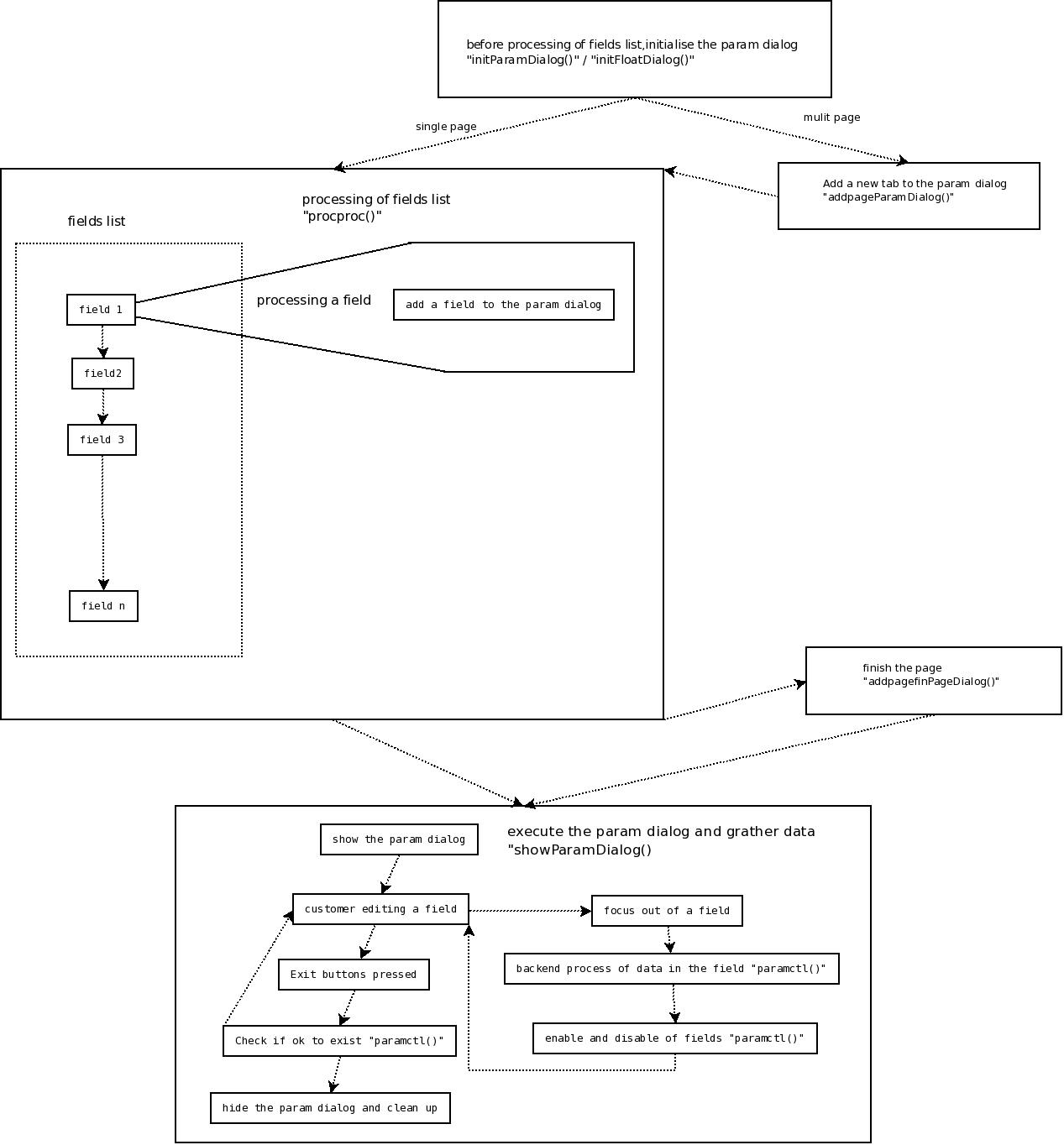
The main different between the old way and the new way, is how we process the field list. As explain above, the old way put a field immediately on the screen when going through the field list. The new way instead of showing it straight the way, we allocate the field to a parameter dialogue box which will be shown once every field was added to the box. When we show the dialogue box, it will contain all the fields. So the user can click amount the fields.
2, Overview of the convertion.
currently the following types of program can be converted.
- lstr
- rep
- cont
to convert any of these program invlove the following step
- declear the program use the clickable dialogue.
- convert the s_flddes / s_outflddes lists
- implement the "paramctl()" function.
3, declear using clickable dialogue.
since we cannot convert all the program in the same time so we need a way to define which program is clickable and which program is not.
To declear a program is clickable simply set the global variable "guiparamready" to YES in the spclinit() function, the spclinit() function get run in the very beginning of the run time.
following is an example
spclinit()
    {
    IMPORT BOOL guiparamready;
    guiparamready = YES;
    init_query(&gl_query[0]);
    }