
|
Size: 7001
Comment:
|
Size: 8663
Comment:
|
| Deletions are marked like this. | Additions are marked like this. |
| Line 101: | Line 101: |
| * assign the handle number so later can identify a paticular field in the list. | * assign the handle number so later can identify a paticular field in paramctl(). * each handle number can be assigned to , (a label field) or (a input field) or (a label field and a input field). |
| Line 125: | Line 126: |
| Line 127: | Line 127: |
| Line 130: | Line 131: |
| { | { |
| Line 156: | Line 157: |
| --- parameters --- | === parameters === |
| Line 158: | Line 159: |
for single page the promptnumber is the handle number specified in the s_flddes and s_outflddes for multiple pages the promptnumber is (pageno -1) * 100 + handle number. |
|
| Line 159: | Line 167: |
| 1. GUIP_UPBUF -- required action after finish edit a input fields.<<BR>> | 1. GUIP_UPBUF -- required action after finish edit a input fields. |
| Line 162: | Line 171: |
| --- return values --- | === return values === |
| Line 164: | Line 174: |
| Line 165: | Line 176: |
| Line 166: | Line 178: |
| 2 -- exit the dialog immediately GUIP_CHKSHW YES -- we will show the fields. |
2 -- exit the dialog immediately GUIP_CHKSHW YES -- we will show the fields. |
| Line 170: | Line 184: |
| Line 171: | Line 186: |
| Line 172: | Line 188: |
| Line 173: | Line 190: |
| Line 174: | Line 192: |
| --- Global Variable --- | === Global Variable === |
| Line 176: | Line 195: |
| Line 177: | Line 197: |
| Line 178: | Line 199: |
| Line 179: | Line 201: |
| Line 180: | Line 203: |
== 6, sccs source code management and compiling. == setting up work directory in you home directory {{{ mkdir -p convertion/old/binx11/ mkdir -p convertion/new/binx11/ mkdir -p convertion/old/sources/ mkdir -p convertion/new/sources/ //retrieve non converted sources files and compile under ~/convertion/old/sources/ //copy non converted sources files to ~/convertion/new/sources/ do the change and compile there. //constantly compare the old program and the new program. to make sure no functionality lost. }}} example for retrieving and put back sorce codes {{{ //retrieve the current version of drcont.c get `wheresccs drcont.c` //retrieve version 14.6 an older version of drcont.c get -r14.6 `wheresccs drcont.c` // retrieve drcont.c to change get -e `wheresccs drcont.c` // put back change of drcont.c delta -y"some comment" `wheresccs drcont.c` }}} compiling programs need to have ../binx11 dir created first. {{{ //compile the cont program drcont.c and putting the executable in ../binx11/drcont cv dr con c //compile the rep program smsrep.c and putting the exectable in ../binx11/smsrep cv sms rep c }}} an example of converted cont program is drcont.c non converted is drcont.c version 14.6 an example of converted rep program is drqrep.c non converted is drqrep.c version 14.2 |
Converting Input screen from non-clickable to clickable
1, Indroduction.
A simplified explanation of how the original program work was show in following diagram,
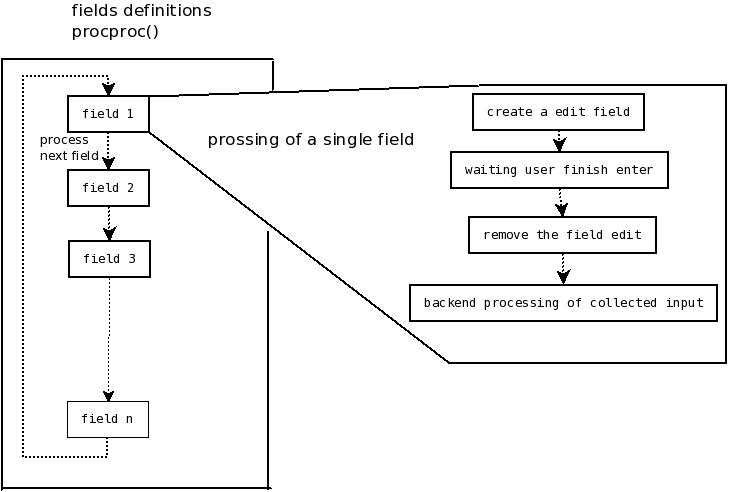
As shown in the diagram, we create a edit field for field 1, then after the user finish editing it we remove it. In other words, at any instance only one edit field was presented, the other field which look like a edit field is actually a label which look like a edit field. So that is why clicking on the other fields will not work.
To be able to have a clickable program , we must have every edit field present the same time. Following is a simplified version of what is going on when the program was converted.
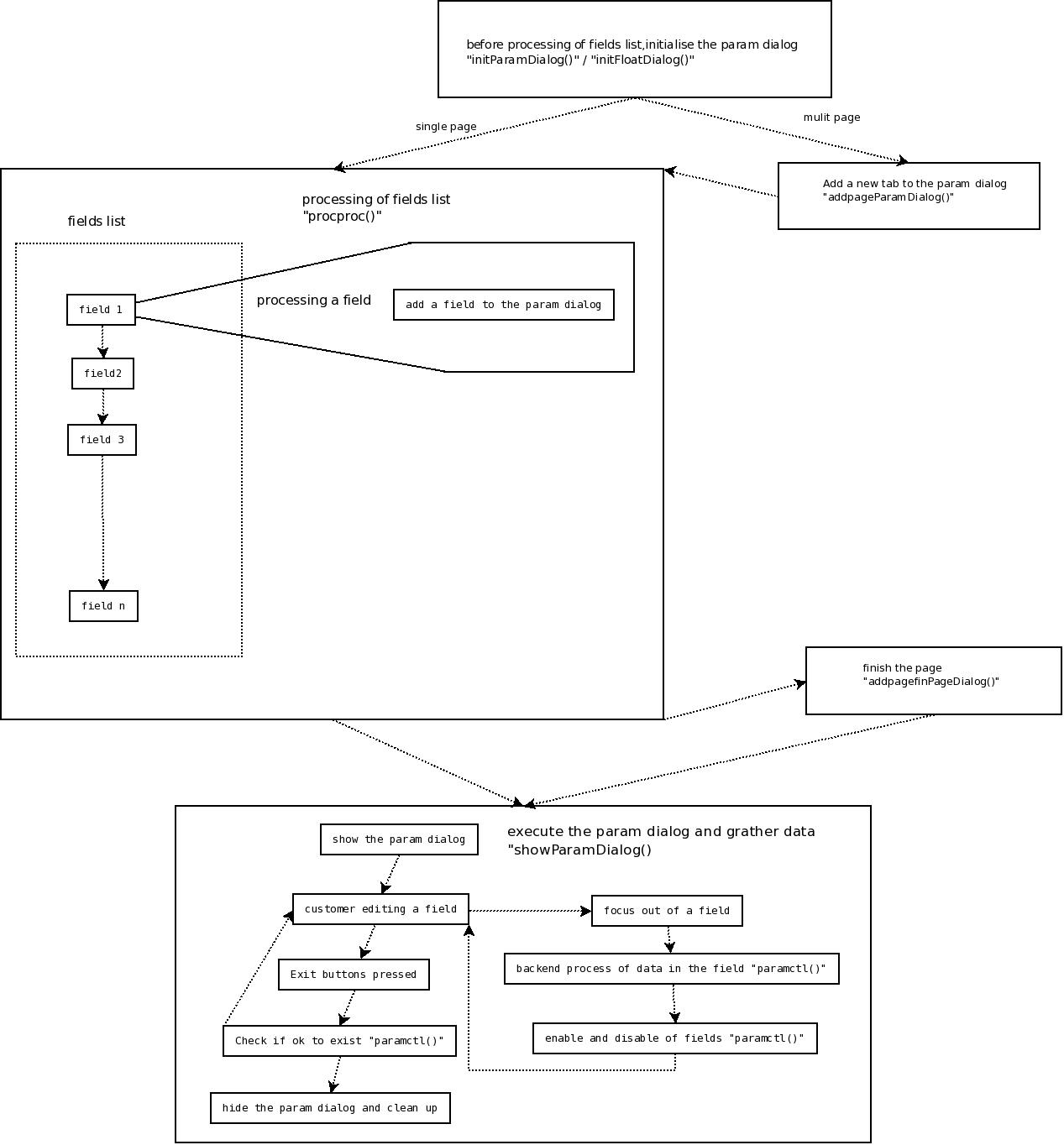
The main different between the old way and the new way, is how we process the field list. As explain above, the old way put a field immediately on the screen when going through the field list. The new way instead of showing it straight the way, we allocate the field to a parameter dialogue box which will be shown once every field was added to the box. When we show the dialogue box, it will contain all the fields. So the user can click amount the fields.
2, Overview of the convertion.
currently the following types of program can be converted.
- lstr
- rep
- cont
to convert any of these program invlove the following step
- declear the program use the clickable dialogue.
- convert the s_flddes / s_outflddes lists
- implement the "paramctl()" function.
3, declear using clickable dialogue.
since we cannot convert all the program in the same time so we need a way to define which program is clickable and which program is not.
To declear a program is clickable simply set the global variable "guiparamready" to YES in the spclinit() function, the spclinit() function get run in the very beginning of the run time.
following is an example
spclinit()
    {
    IMPORT BOOL guiparamready;
    guiparamready = YES;
    }
4, convert the s_flddes lists
converting rep and lstr programs
in rep and lstr type of program , we normally have one page for inputs, if more then one list exist need to combine them into one.
converting cont programs
in cont programs we will have multiple pages, due to historical reason each page will have 2 fields lists one for labels and one for input fields.
following are the definition of a nonclickable program field lists
GLOBAL  COUNT   nscrn = 2;//number of pages
GLOBAL  struct  s_outflddes *scrnarray[] = {NULL, scrn, scrn2};//labels list for each page
GLOBAL  struct  s_flddes    *procarray[] = {NULL, flds, flds2};//inputs list for each page
GLOBAL  struct  s_outflddes scrn[] =
    {
    {0,COMPUTE,COMPARE,0,"",&Debug,NORECBUF,INTEGER,INTEGER|CONSTANT,YES},
    {IF_EQUAL,OUTPUT, 4,OCOL1,"58t.'auto-allocate unallocated amounts when posting trans'' :'"},
    {0,OUTPUT, LINE+1,OCOL1,"58t.'default period - week/month (W/M)'' :'"},
    {0,OUTPUT, LINE+1,OCOL1,"58t.'use private customer group'' :'"},
    {0,OUTPUT, LINE+1,OCOL1,"58t.'customer lookups by contact details'' :'"},
    {0,NULL},
    } ;
GLOBAL  struct  s_flddes    flds[] =
    {
    {0,COMPUTE,COMPARE,0,"",&Debug,NORECBUF,INTEGER,INTEGER|CONSTANT,YES},
    {IF_EQUAL,EDIT,4 ,ICOL1,"yn", OFFSET(s_drcont, dissct),      CONTROL, CHAR},
    {0,EDIT|SPECIAL,LINE+1,ICOL1,"mw", OFFSET(s_drcont, defper),      CONTROL, CHAR,0,0,0,0,speclfunc},
    {0,EDIT,LINE+1,ICOL1,"yn", OFFSET(s_drcont, priv_grp),    CONTROL, CHAR},
    {0,EDIT,LINE+1,ICOL1,"yn", OFFSET(s_drcont, use_contact),  CONTROL, CHAR},
    {0,NULL},
    } ;
GLOBAL  struct  s_outflddes scrn[] =
    {
    //something
    .......
    .......
    } ;
GLOBAL  struct  s_flddes    flds[] =
    {
    //something
    ......
    ......
    } ;
the above example define a cont program contain 2 pages and their fields lists before the clickable conversion.
note that the page start at array[1].
to convert do the following
- convert all the LINE+1 to actual numbers
- convert all the OUTPUT flagts to DISPLAY
- only reserve the lines which is either DISPLAY or EDIT or INPUT
- remove all the SPECIAL flags and special functions is exist
- zero all the IF_*, CONT, flags
- assign the handle number so later can identify a paticular field in paramctl().
- each handle number can be assigned to , (a label field) or (a input field) or (a label field and a input field).
using the above fist page as example the following is the code after conversion.
GLOBAL  struct  s_outflddes scrn[] =
    {
    {1,DISPLAY, 4,OCOL1,"58t.'auto-allocate unallocated amounts when posting trans'' :'"},
    {2,DISPLAY, 5,OCOL1,"58t.'default period - week/month (W/M)'' :'"},
    {3,DISPLAY, 6,OCOL1,"58t.'use private customer group'' :'"},
    {4,DISPLAY, 7,OCOL1,"58t.'customer lookups by contact details'' :'"},
    {0,NULL},
    } ;
GLOBAL  struct  s_flddes    flds[] =
    {
    {1,EDIT,4 ,ICOL1,"yn", OFFSET(s_drcont, dissct),      CONTROL, CHAR},
    {2,EDIT,5,ICOL1,"mw", OFFSET(s_drcont, defper),      CONTROL, CHAR},
    {3,EDIT,6,ICOL1,"yn", OFFSET(s_drcont, priv_grp),    CONTROL, CHAR},
    {4,EDIT,7,ICOL1,"yn", OFFSET(s_drcont, use_contact),    CONTROL, CHAR},
    {0,NULL},
    } ;
5, implement the paramctl()
following is a template for the paramctl() function.
BOOL
paramctl(int act, int promptnum)
    {
    if(act == GUIP_UPBUF)
         {
         IMPORT TEXT last_entered_txt[80];
         IMPORT TEXT last_field_txt[80];
         switch(promptnum)
             {
             default:
                 break;
             }
         }
     else if(act == GUIP_CHKSHW)
         {
         IMPORT TEXT last_prompt_txt[80];
         switch(promptnum)
             {
             default:
                 break;
             }
         }
      else if(act == GUIP_CHKEND)
         {
         }
    return YES;
    }
parameters
promptnum -- the field we are referring to.
for single page the promptnumber is the handle number specified in the s_flddes and s_outflddes
for multiple pages the promptnumber is
(pageno -1) * 100 + handle number.
act -- what the function is currently used for.
- GUIP_UPBUF -- required action after finish edit a input fields.
- GUIP_CHKSHW -- determine if fields should be shown.
- GUIP_CHKEND -- required action when exiting the dialogue.
return values
GUIP_UPBUF
YES -- move to next field
NO -- stay in the current field
2 -- exit the dialog immediately
GUIP_CHKSHW YES -- we will show the fields.
NO -- we will not show the fields.
2 -- if the fields has a label, display the string stored in last_prompt_txt as label text.
GUIP_CHKEND
YES -- we can safely exit and close the dialog
NO -- cannot close the dialog , remain in the dialog.
Global Variable
GUIP_UPBUF
last_field_txt[80] -- the text of the field when user focus in the field.
last_entered_txt[80] -- the text of the field when user focus out the field.
GUIP_CHKEND
last_prompt_txt[80] -- the text going to be displayed on the labels fields.
6, sccs source code management and compiling.
setting up work directory in you home directory
mkdir -p convertion/old/binx11/
mkdir -p convertion/new/binx11/
mkdir -p convertion/old/sources/
mkdir -p convertion/new/sources/
//retrieve non converted sources files and compile under ~/convertion/old/sources/
//copy non converted sources files to ~/convertion/new/sources/ do the change and compile there.
//constantly compare the old program and the new program. to make sure no functionality lost.
example for retrieving and put back sorce codes
//retrieve the current version of drcont.c
get `wheresccs drcont.c`
//retrieve version 14.6 an older version of drcont.c
get -r14.6 `wheresccs drcont.c`
// retrieve drcont.c to change
get -e `wheresccs drcont.c`
// put back change of drcont.c
delta -y"some comment" `wheresccs drcont.c`
compiling programs need to have ../binx11 dir created first.
//compile the cont program drcont.c and putting the executable in  ../binx11/drcont
cv dr con c
//compile the rep program smsrep.c and putting the exectable in ../binx11/smsrep
cv sms rep c
an example of converted cont program is drcont.c non converted is drcont.c version 14.6 an example of converted rep program is drqrep.c non converted is drqrep.c version 14.2