
|
Size: 1868
Comment:
|
← Revision 22 as of 2013-09-18 06:09:34 ⇥
Size: 1892
Comment: converted to 1.6 markup
|
| Deletions are marked like this. | Additions are marked like this. |
| Line 2: | Line 2: |
| This guide is based on [http://openvpn.se/files/howto/openvpn-howto_roll_your_own_installation_package-Rev1.1.html HowTo Roll Your Own OpenVPN Windows Installation Package]. | This guide is based on [[http://openvpn.se/files/howto/openvpn-howto_roll_your_own_installation_package-Rev1.1.html|HowTo Roll Your Own OpenVPN Windows Installation Package]]. |
| Line 4: | Line 4: |
| The Windows build machine must have [http://nsis.sourceforge.net/Download The Nullsoft Scriptable Install System] installed. Next obtain the [http://www.openvpn.se/files/install_packages_source/ installation source package]. If problems persist with differing versions of OpenVPN on the client and server try using the same version as the server on the client. E.g. Server version: 2.0.7, download [http://www.openvpn.se/files/install_packages_source/openvpn_install_source-2.0.7-gui-1.0.3.zip OpenVPN GUI install source 2.0.7]. In theory all 2.0.x releases should be compatible with each other. | The Windows build machine must have [[http://nsis.sourceforge.net/Download|The Nullsoft Scriptable Install System]] installed. Next obtain the [[http://www.openvpn.se/files/install_packages_source/|installation source package]]. If problems persist with differing versions of OpenVPN on the client and server try using the same version as the server on the client. E.g. Server version: 2.0.7, download [[http://www.openvpn.se/files/install_packages_source/openvpn_install_source-2.0.7-gui-1.0.3.zip|OpenVPN GUI install source 2.0.7]]. In theory all 2.0.x releases should be compatible with each other. |
| Line 8: | Line 8: |
| attachment:install_source_folder.png | {{attachment:install_source_folder.png}} |
| Line 10: | Line 10: |
| In the {{{openvpn\config}}} folder place the generated {{{key}}} and {{{config.ovpn}}} files from the ["OpenVPN"] document. | In the {{{openvpn\config}}} folder place the generated {{{key}}} and {{{config.ovpn}}} files from the [[OpenVPN]] document. |
| Line 12: | Line 12: |
| attachment:config_folder.png | {{attachment:config_folder.png}} |
| Line 25: | Line 25: |
| attachment:compile_nsis.png | {{attachment:compile_nsis.png}} |
| Line 27: | Line 27: |
| attachment:makensisw.png | {{attachment:makensisw.png}} |
Rolling out Windows OpenVPN clients
This guide is based on HowTo Roll Your Own OpenVPN Windows Installation Package.
The Windows build machine must have The Nullsoft Scriptable Install System installed. Next obtain the installation source package. If problems persist with differing versions of OpenVPN on the client and server try using the same version as the server on the client. E.g. Server version: 2.0.7, download OpenVPN GUI install source 2.0.7. In theory all 2.0.x releases should be compatible with each other.
Extract openvpn_install_source-2.0.7-gui-1.0.3.zip and open the newly created folder.
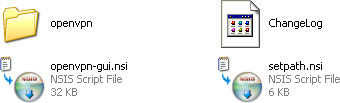
In the openvpn\config folder place the generated key and config.ovpn files from the OpenVPN document.

Return back to the root of the openvpn_install_source folder and open openvpn-gui.nsi in an editor.
# Include your custom config file(s) here.
  SetOutPath "$INSTDIR\config"
  File "${HOME}\config\key"                     # Add this line
  File "${HOME}\config\config.ovpn"             # Add this line
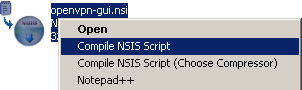
Finally the openvpn-gui.nsi file needs to compile and build an installable executable. Right click on openvpn-gui.nsi and select Compile NSIS Script.
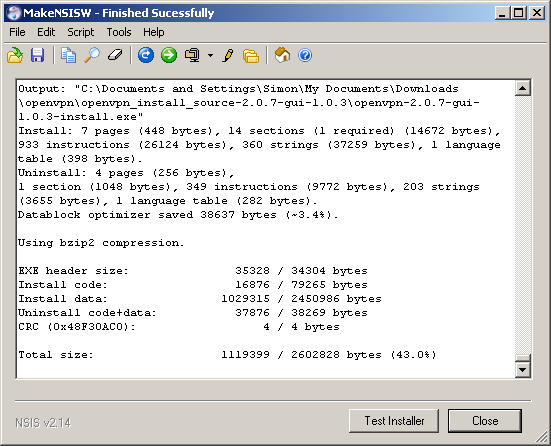
If successful a file similarly named to openvpn-2.0.7-gui-1.0.3-install.exe will be generated. For easier management, include the client side IP address in the file name. E.g. openvpn-2.0.7-gui-1.0.3-install-10.3.0.2.exe.