
Installing Java printing (customer side) Download the following: http://customers.creativecomputing.com.au/winprint/crecomps_install.exe
Because this program is unsigned, you may get a warning "crecomps_install.exe isn't commonly downloaded, Make sure you trust crecomps_install.exe before you open it" If you do, you have to tell windows that you do want to keep this file:
Click on the downloads icon of your browser:
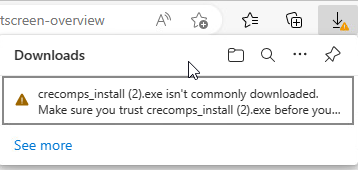
Click on the 3 dots following the warning message and choose "keep"
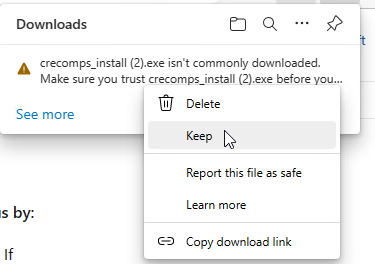
On the screen that shows up, click the down arrow next to "show more"
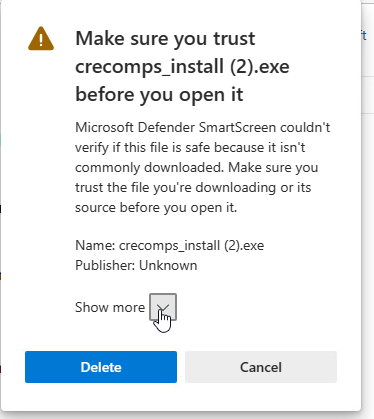
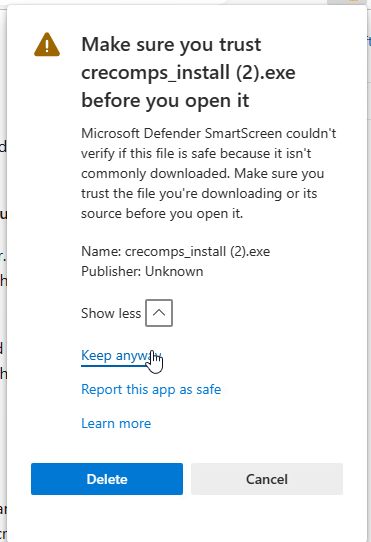
And choose "keep anyway"
Also, download this program:
http://customers.creativecomputing.com.au/winprint/jre-8u171-windows-i586.exe
This is the version that is successfully tested with Control Java Printing, do not substitute any other version.
Install the Java program first. Double click on jre-8u171-windows-i586.exe in your Download directory.