
ATTRIBUTE GROUP CODES / ATTRIBUTES
This section shows how to set up and use Attribute Group Codes. It also illustrates how these can be combined with Colour and Size codes giving further flexibility.
An attribute group code is set up using Colour Palette Maintenance as shown below. Up to twenty-two elements are allowed. Each may have up to five digits for the code and up to fifteen characters of description.
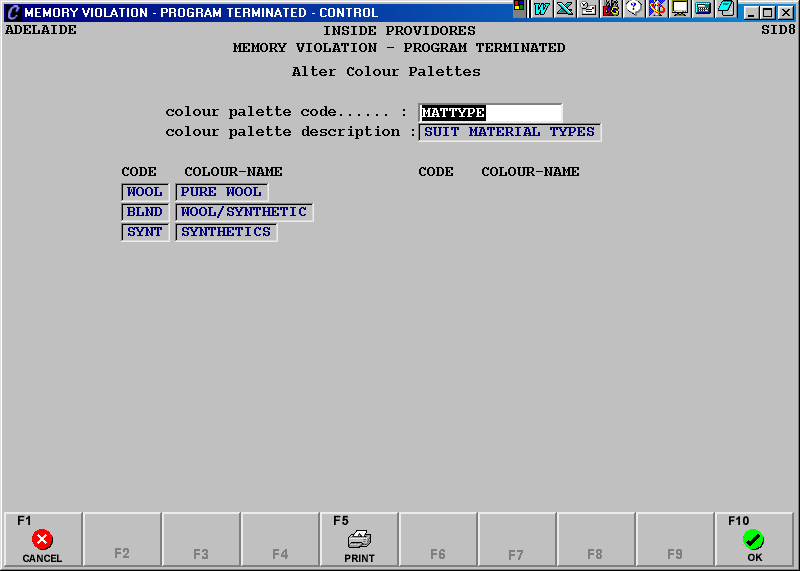
This code is now linked to a statistical stock item. This item will have no costs and no sell price.
A statistical child record of the above stock item is created for each element of the attribute record. These records will have a cost and sell price if they contribute to the total sell price. They will also have an attribute, which is the name from the appropriate element of the attribute record.
Create a statistical stock item with same attribute group code as that linked to the statistical item MATERIAL above. This will be the Bill of Material code and as it will be set up to explode during sales/order entry the associated stock code and the category flag need to be set appropriately. This item may have a cost and sell price if there is to be a base charge for the product, which then increases by different amounts, depending upon the attribute and other options selected.
The category record would be set as follows.
To illustrate how the attribute works create a simple Bill of Material as follows.
This contains the generic suit material stock item together with the quantity required to make the end product.
A sale of this item will show a drop down box with the elements of the attribute group code.
Once an attribute is selected a colour selection may need to be made. This can be set up in one of two ways. If the same colour range is available for each attribute then a colour palette would be set up containing the complete range of available colours. The code for this palette would then be entered into the colour palette code field (page 2, field 6) of the BOM stock record. If each attribute has its own range of available colours then a colour palette needs to be set up for each attribute. This must have as the colour palette code the attribute name.
No further action is needed as, during the transaction, when an attribute is chosen a search is automatically made for a colour palette with the same code as the attribute name.
An additional item which affects the finished price of the product may be required, for example the jacket lining.
Create a size run record of the available lining options.
Create a statistical generic stock item for lining with no costs or sell price. This will have the size run code field set to the name of the size run record.
Child records are then created for each element of the size run. These will have an entry in the size field, on page 2, of the size name. They may be statistical or non-statistical. They will have a sell price if they affect the final end product sell price. In the above example the child item for the size NONE would be statistical and have no sell price.
Generic stock item for lining
Child stock item
A third such item could also be created using the sub-size fields. Note that colours cannot be associated with these second and third codes.
Set up the Bill of Materials with the lining stock item and other statistical items to record measurements and so forth.
The following screens show the entry of an order for the above suit.
Select the appropriate attribute.
Select a colour from the palette associated with the attribute selected.
Select the require lining and then enter through the price fields. The BOM will then be displayed.
The generic codes for the suit and lining materials have been replaced with the actual product codes. The base price, the components total and the final total for the item are displayed. This BOM has been set up so that component quantities cannot be altered. Complete the bill with the required size information.
A product code is created, if it doesn’t already exist, comprising the BOM code, the attribute code, the lining code and the attribute colour code up to a maximum of 15 characters.