
|
Size: 2620
Comment:
|
Size: 3499
Comment: converted to 1.6 markup
|
| Deletions are marked like this. | Additions are marked like this. |
| Line 1: | Line 1: |
| Installing VNC | = Installing VNC = Note: The [[addusr]] script will automatically do these for you if you specify that you want a new vnc session added. |
| Line 5: | Line 7: |
| /etc/inittab }}} Add a line similar to the following to the mentioned file. |
/etc/inittab }}} Add a line similar to the following to the mentioned file.. |
| Line 10: | Line 11: |
| v5:345:off:/bin/su - ccc -c /usr/local/bin/inittab_vnc >> /var/log/vnc.ccc 2>&1 }}} Note that this line is inactive as specified by '''off''' . Upon successful configuration this will be changed to '''respawn''' . Next {{{inittab_vnc}}} has be to installed, this is a perl script which must be modified each time a VNC session is added or removed. There is a copy stored locally on robin, alternatively a copy may be obtained from a client who recently started using VNC. Such as [/pywiki/TJMBrisbane TJMBrisbane] or VNC. |
v5:345:off:/bin/su - ccc -c /usr/local/bin/inittab_vnc >> /var/log/vnc.ccc 2>&1 }}} Note that this line is inactive as specified by '''off''' . Upon successful configuration this will be changed to '''respawn''' . Next {{{inittab_vnc}}} has be to installed, this is a perl script which must be modified each time a VNC session is added or removed. There is a copy stored locally on robin, alternatively a copy may be obtained from a client who recently started using VNC. Such as [[TJMBrisbane]] or VNC. |
| Line 17: | Line 17: |
| %displaymap = ( 'ccc' => 5, ); }}} The above array shows that there is only one VNC session, available for the user ccc on display 5. Next a password for that user much be created. To accomplish this, you must switch to that user using {{{su - ccc}}} and execute {{{vncpassword}}} . This will create a password for the current user in the home directory. |
%displaymap = ( 'ccc' => 5, ); }}} The above array shows that there is only one VNC session, available for the user ccc on display 5. Next a password for that user much be created. To accomplish this, you must switch to that user using {{{su - ccc}}} and execute {{{vncpassword}}} . This will create a password for the current user in the home directory. It would of greater benefit if the password file and the below mentioned {{{xstartup}}} be store in {{{/etc/skel/.vnc/}}} so when a user is created the appropriate files are copied. |
| Line 25: | Line 21: |
| $HOME/.vnc/passwd }}} The {{{inittab_vnc}}} program depends on the user's home directory being in a specific location. Ensure that home directories are being correctly created. The default directory configuration must be set such that new users have correct paths. |
$HOME/.vnc/passwd }}} The {{{inittab_vnc}}} program depends on the user's home directory being in a specific location. Ensure that home directories are being correctly created. The default directory configuration must be set such that new users have correct paths in {{{/etc/default/useradd}}}. |
| Line 30: | Line 25: |
| /etc/default/useradd # This file must contain HOME=/u/cc/usr }}} |
GROUP=3232 # Non default value HOME=/u/cc/usr # Non default value INACTIVE=-1 EXPIRE= SHELL=/bin/bash SKEL=/etc/skel }}} |
| Line 35: | Line 29: |
| /u/cc/usr/ccc/.vnc/passwd }}} |
/u/cc/usr/ccc/.vnc/passwd }}} |
| Line 40: | Line 33: |
| #!/bin/sh export NODEID="vnc$DISPLAY" sleep 5 # exec /u/cc/std/binx11/ccmenubar exec fvwm }}} |
#!/bin/sh . /u/cc/usr/common.sh export NODEID="vnc$DISPLAY" # exec /u/cc/std/binx11/ccmenubar exec fvwm }}} |
| Line 48: | Line 36: |
| {{attachment:vncviewer.png}} | |
| Line 53: | Line 41: |
| /sbin/init q }}} |
/sbin/init q }}} To set up the VNC terminal on the client side, see: [[VNCTerminal]] = Create new VNC in CentOS6 = Add new user to /u/ccr.14/usr/vncusers.sh advancing a number #!/bin/bash USER[1]='jon' USER[2]='kafu' USER[3]='bernie' USER[4]='jenny' USER[5]='gaurav' USER[6]='boris' Add new number to start up string ACTIVE_VNCSCREENS in /etc/init/start-xvncs.conf Start new VNC session: initctl start xvnc VNC=6 [[Terminal]] |
Installing VNC
Note: The addusr script will automatically do these for you if you specify that you want a new vnc session added.
Firstly ensure that vncserver is installed, package name is typically vnc-server . To ensure that VNC is always available and restarting if killed. It need to be added to inittab .
/etc/inittab
Add a line similar to the following to the mentioned file..
v5:345:off:/bin/su - ccc -c /usr/local/bin/inittab_vnc >> /var/log/vnc.ccc 2>&1
Note that this line is inactive as specified by off . Upon successful configuration this will be changed to respawn . Next inittab_vnc has be to installed, this is a perl script which must be modified each time a VNC session is added or removed. There is a copy stored locally on robin, alternatively a copy may be obtained from a client who recently started using VNC. Such as TJMBrisbane or VNC.
Once installed the array %displaymap is the only place where modification is required.
%displaymap = ( 'ccc' => 5, );
The above array shows that there is only one VNC session, available for the user ccc on display 5. Next a password for that user much be created. To accomplish this, you must switch to that user using su - ccc and execute vncpassword . This will create a password for the current user in the home directory. It would of greater benefit if the password file and the below mentioned xstartup be store in /etc/skel/.vnc/ so when a user is created the appropriate files are copied.
$HOME/.vnc/passwd
The inittab_vnc program depends on the user's home directory being in a specific location. Ensure that home directories are being correctly created. The default directory configuration must be set such that new users have correct paths in /etc/default/useradd.
GROUP=3232 # Non default value HOME=/u/cc/usr # Non default value INACTIVE=-1 EXPIRE= SHELL=/bin/bash SKEL=/etc/skel
Ensuring that the above is correct, the full path of the password will be as follows:
/u/cc/usr/ccc/.vnc/passwd
An xstartup script must be created in the same directory as the password file and executes the following commands upon the establishment of a session
To test the VNC session, execute the inittab_vnc as the user ccc . Then opening vncviewer for either Linux or Windows specify the machine's IP (likely VPN) address and session number which in this case is 5 after pressing connect you will be asked for a password.
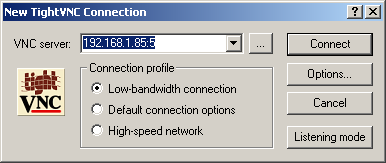
Lastly you should be connected. To ensure that inittab_vnc is run automatically edit the inittab file and replace off to respawn . This will allow the session to be started automatically. The parsing of inittab can be forced by executing the following:
/sbin/init q
To set up the VNC terminal on the client side, see: VNCTerminal
Create new VNC in CentOS6
Add new user to /u/ccr.14/usr/vncusers.sh advancing a number
#!/bin/bash USER[1]='jon' USER[2]='kafu' USER[3]='bernie' USER[4]='jenny' USER[5]='gaurav' USER[6]='boris'
Add new number to start up string ACTIVE_VNCSCREENS in /etc/init/start-xvncs.conf
Start new VNC session:
initctl start xvnc VNC=6